September 14, 2026 · Magati Joel
Building a Cross-Platform Invoice App with Flutter
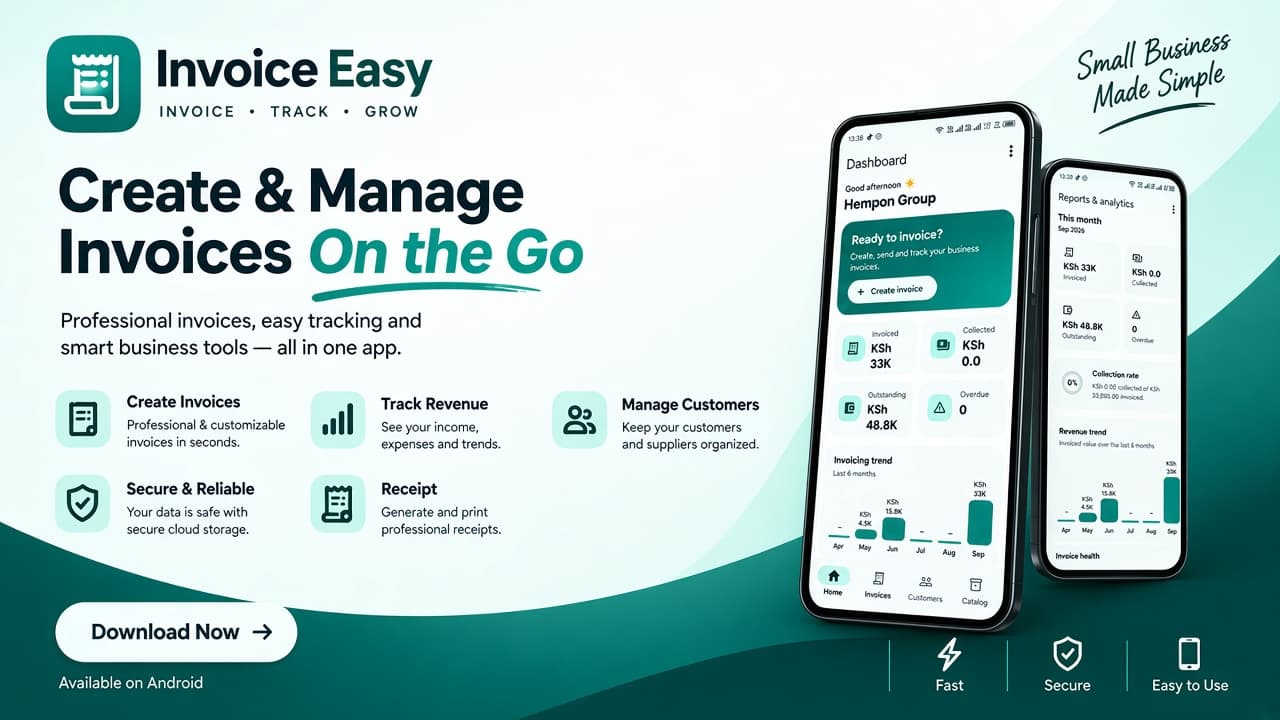
How I evolved InvoiceEasy from a lightweight local invoice generator into an offline-first, cloud-enabled business invoicing platform built with Flutter, Supabase, and a modern cross-platform architecture.
Why This Project Exists
Not every small business needs a complicated accounting platform.
A freelancer, consultant, contractor, retailer, or small professional business may simply need a reliable way to manage customers, products and services, create professional invoices, track payments, and keep business records organized.
That idea inspired InvoiceEasy, a cross-platform invoicing application built with Flutter.
The project started as a lightweight local invoice generator. Over time, it evolved into something much more ambitious: an offline-first business invoicing platform with authentication, cloud synchronization, business profiles, reporting, and a foundation for subscription-based SaaS features.
The goal remains the same — keep invoicing simple while making the application powerful enough for real-world business use.
The Problem
Creating invoices manually in Word or Excel can work, but it quickly becomes repetitive.
Users have to copy previous documents, change invoice numbers, recalculate totals, adjust table rows, export files, and make sure information from the previous client does not accidentally remain.
As businesses grow, the problem becomes larger.
Customers need to be managed separately. Products and services need to be reused. Payments need to be tracked. Old invoices need to remain accessible. Business details need to appear consistently on documents.
InvoiceEasy was designed around these everyday workflows.
The application supports:
- Creating and editing invoices
- Multiple invoice line items
- Products and services
- Customer management
- Automatic calculations
- Discounts and VAT
- Invoice status workflows
- Payment recording and payment progress
- Invoice history
- Archived invoices
- Professional PDF generation
- Printing and sharing
- Business branding and payment details
- Dashboard metrics
- Reports and exports
- Light and dark themes
- Offline-first data storage
- Cloud synchronization
- Account management
- Receipt Printing
The interface is designed to work across different screen sizes and platforms without turning a simple invoicing workflow into a complicated accounting system.
From Local App to Cloud Platform
One of the biggest changes in InvoiceEasy was moving beyond local-only storage.
The original version relied heavily on local persistence. This was useful for an offline application, but it also meant that business data remained tied to a particular device.
A production-oriented application needs a better approach.
InvoiceEasy now uses an offline-first architecture where local data remains available while cloud synchronization provides backup and access across authenticated devices.
The application does not require an internet connection for every action.
Instead, changes can be made locally and placed into a synchronization queue. When connectivity is available, those changes can be pushed to the cloud and remote changes can be pulled back down.
This approach makes the application feel responsive while still providing the advantages of cloud storage.
Authentication and Account Ownership
The cloud version uses Supabase for authentication and data storage.
Each authenticated InvoiceEasy account owns one business profile.
The application is business-neutral rather than tied to a particular industry. A freelancer, retail business, consultant, contractor, or professional service provider can configure their own business information and use the same core invoicing workflow.
The ownership model is intentionally simple:
User Account → Business Profile → Customers → Products & Services → Invoices → Payments
This avoids unnecessary business-switching complexity while maintaining clear ownership and data isolation.
Row Level Security is used on the cloud database so authenticated users can only access data belonging to their account.
The Invoice Workflow
The invoice creation experience is built around speed.
A user can select an existing customer or create one quickly, add products or services, enter custom line items, adjust quantities and prices, apply discounts, enable VAT, and set payment terms.
Totals update automatically as the invoice changes.
The resulting invoice moves through a practical workflow rather than simply being a static document.
Users can:
- Save drafts
- Create invoices
- Send or share invoices
- Record payments
- Track outstanding balances
- Edit invoices
- Duplicate invoices
- Cancel invoices
- Archive invoices
- View invoice history
This turns InvoiceEasy from a document generator into a lightweight invoice management system.
Customers and Products
A good invoicing application should not make users repeatedly type the same information.
InvoiceEasy therefore separates customers and products or services from individual invoices.
Customers can have reusable contact information and invoice history.
Products and services can be stored in a catalog and reused when creating new invoices.
This makes repeated invoicing significantly faster, particularly for businesses with recurring customers or standard services.
Professional Invoice Documents
Generating a PDF is different from displaying an invoice on screen.
Instead of simply attempting to print the Flutter interface, InvoiceEasy uses a dedicated PDF layout.
This gives control over:
- A4 page dimensions
- Typography
- Tables
- Spacing
- Page breaks
- Long descriptions
- VAT breakdowns
- Payment information
- Business branding
- Notes and payment terms
Business information can include details such as a logo, KRA PIN, M-Pesa Till or Paybill information, bank details, VAT information, and other payment instructions.
The resulting document is intended to be useful both digitally and as a printable business document.
Payment Tracking
Invoices are not finished when they are created.
InvoiceEasy includes payment tracking so a business can see how much has been paid and what remains outstanding.
Payments can be recorded against invoices, allowing the application to calculate payment progress and outstanding balances.
This information also feeds into dashboard and reporting functionality.
The aim is not to replace a full accounting package, but to provide the information a small business needs to understand its invoicing activity.
Dashboard and Reports
The application includes a dashboard designed to provide a quick overview of business invoicing activity.
Important information can include:
- Invoice totals
- Paid amounts
- Outstanding balances
- Invoice counts
- Collection performance
- Recent invoices
- Customer activity
Reports provide a deeper view of the same data and can be exported where appropriate.
The dashboard is intentionally focused on actionable information rather than attempting to reproduce the complexity of an enterprise accounting system.
Offline-First Architecture
One of the more important architectural decisions in InvoiceEasy is treating offline operation as a first-class feature.
Local data is stored independently from the cloud connection.
When a user creates or modifies a record, the application updates the local data immediately and records a pending synchronization change.
The synchronization layer can then:
- Detect pending local changes
- Push changes to the cloud
- Pull remote changes
- Retry failed operations
- Resolve conflicts
- Update local records
- Report synchronization status
This means a temporary network failure does not have to interrupt the invoicing workflow.
The architecture also scopes local storage to the authenticated account so that users sharing the same device do not inadvertently access another user's local business data.
Sync and Conflict Handling
Cloud synchronization introduces a new class of problems that do not exist in a purely local application.
Two devices may modify the same record.
A device may remain offline for several hours.
A network request may fail after the server has already processed the operation.
A user may log into the application for the first time on a new device and need their existing business data.
InvoiceEasy therefore uses a synchronization queue, timestamps, retry handling, cloud pull/push operations, and a defined conflict strategy.
The current approach uses last-write-wins semantics based on record update timestamps while maintaining soft-delete information for synchronized records.
The objective is not to make synchronization invisible at the expense of reliability. The application also exposes synchronization status so users can understand whether their data is synchronized, pending, or experiencing an error.
The Tech Stack
InvoiceEasy is built with:
- Flutter
- Dart
- Material Design 3
- Riverpod
- Supabase
- Supabase Auth
- PostgreSQL
- Row Level Security
- SharedPreferences
- Printing
- Share Plus
- Intl
- UUID
- File Picker
Flutter provides the cross-platform application layer, while Supabase provides authentication, cloud persistence, and the backend foundation.
Riverpod is used for application state and dependency management.
The PDF layer is kept separate from the interactive Flutter interface so that invoice documents can be designed specifically for printing and sharing.
Responsive Cross-Platform Design
Cross-platform development is not simply about making the same interface compile everywhere.
A desktop invoicing application has different spatial requirements from a mobile application.
InvoiceEasy therefore uses responsive layouts to adapt navigation, forms, tables, dashboards, and invoice workflows to different screen sizes.
The application supports light and dark themes and uses Material 3 components throughout the interface.
The goal is to maintain the same product language while allowing the layout to adapt naturally to desktop, tablet, and mobile environments.
Kenyan Business Context
Although InvoiceEasy is designed to be useful across different types of businesses, the application also considers practical requirements for Kenyan businesses.
Invoice documents can accommodate:
- Kenyan shilling currency formatting
- KRA PIN
- VAT information
- M-Pesa Till or Paybill details
- Bank payment details
- Local date formatting
- Business payment terms
These details are treated as business configuration rather than hard-coded assumptions, allowing the same application architecture to support different types of businesses.
Interesting Challenges
One of the original Flutter challenges was managing dynamic invoice line items.
Each line item could require its own description, quantity, and price controllers. Adding or removing rows needed to keep the UI controllers synchronized with the underlying invoice model.
PDF generation introduced another challenge.
A screen can scroll indefinitely, but a PDF has fixed page boundaries. Long descriptions and large invoices therefore require proper wrapping, pagination, and layout management.
Moving to cloud synchronization introduced an entirely different category of challenges.
The application now needs to handle authentication state, local account isolation, pending changes, cloud records, network failures, retries, conflicts, and first-login data bootstrap.
These concerns require more architectural discipline than a local-only application.
Data Architecture
The application separates its major business entities into independent models.
The core data structure can be represented as:
User → Business Profile → Customers → Products & Services → Invoices → Payments
Invoices contain their own line items and payment information while customers and products remain reusable records.
Cloud records contain ownership information, serialized business data, update timestamps, and soft-delete information.
This separation allows the application to maintain a simple local data model while synchronizing records with the cloud.
SaaS Direction
The cloud architecture also provides the foundation for turning InvoiceEasy into a subscription-based SaaS product.
The planned monetization layer will introduce subscription plans and usage limits rather than making the core application unnecessarily complicated.
Potential limits can be applied to areas such as:
- Number of invoices
- Number of customers
- Number of products or services
- Cloud storage
- Online invoice features
- Payment functionality
The exact subscription structure can evolve as the product is tested with real users.
Online Invoicing
Another planned stage is public online invoices.
Instead of sending only a PDF attachment, a business could provide a secure web link to an invoice.
A customer could open the invoice from their browser and view:
- Business information
- Invoice details
- Items
- Taxes
- Amount paid
- Outstanding balance
- Payment instructions
This creates a path from InvoiceEasy as an invoicing application toward a more complete digital invoicing platform.
Customer Payment Links
Online invoices also create the possibility of customer payment links.
The long-term workflow is:
Invoice → Online Invoice → Payment Link → Customer Payment → Payment Confirmation → Updated Invoice
Payment integrations will require appropriate backend processing, transaction verification, security controls, and support for relevant payment providers.
The important part of the architecture is that payment functionality can be added without redesigning the core invoice model.
Security
Cloud functionality also changes the security requirements of the application.
Authentication is handled through Supabase Auth.
Database access is protected using Row Level Security.
Each user's records are associated with their authenticated identity.
Administrative operations such as account deletion are kept on the server side rather than exposing privileged credentials inside the Flutter application.
This separation is important because a mobile or desktop application should never contain a database service-role credential.
Lessons Learned
The evolution of InvoiceEasy reinforced several lessons.
First, a simple user workflow does not necessarily mean a simple architecture.
The user should be able to create an invoice in a few steps even if the application underneath has authentication, persistence, synchronization, PDF generation, reporting, and cloud infrastructure.
Second, local-first design is valuable when connectivity cannot be assumed.
Third, separating business logic from presentation makes it easier to evolve the application.
The interactive invoice form and printable invoice document are different interfaces built around the same underlying data.
Finally, features should serve the workflow.
Adding complexity simply because it is technically possible can make a business application harder to use.
What's Next
The next stage of InvoiceEasy focuses on turning the existing cloud foundation into a production-ready SaaS platform.
The roadmap includes:
- Subscription management
- Usage limits
- Online invoices
- Customer payment links
- Payment integrations
- Improved cloud administration
- Production security hardening
- Reliability and synchronization testing
- Production deployment
The objective is to grow the application without losing the simplicity that motivated the project in the first place.
Final Thoughts
InvoiceEasy started as a practical Flutter project focused on one problem: creating professional invoices without the repetitive work of Word or Excel.
It has since grown into a broader business application.
The current architecture combines a responsive Flutter interface, local-first storage, Supabase authentication and cloud persistence, synchronization, customer and product management, invoice workflows, payment tracking, reporting, and professional PDF generation.
It still does not try to be a complete accounting system.
Instead, it focuses on a narrower and more useful goal: making invoicing and basic invoice management faster, clearer, and more reliable for small businesses.
That focus is what makes the project interesting.
The challenge is no longer simply building an invoice screen. It is building the infrastructure around that screen so the product can remain simple for the user while becoming significantly more capable underneath.