July 28, 2024 · Magati Joel
Building a Flutter Food App with Firebase: A Deep Dive
Explore the architecture and key features of the Foodie App, a real-time mobile ordering application built with Flutter and Firebase.
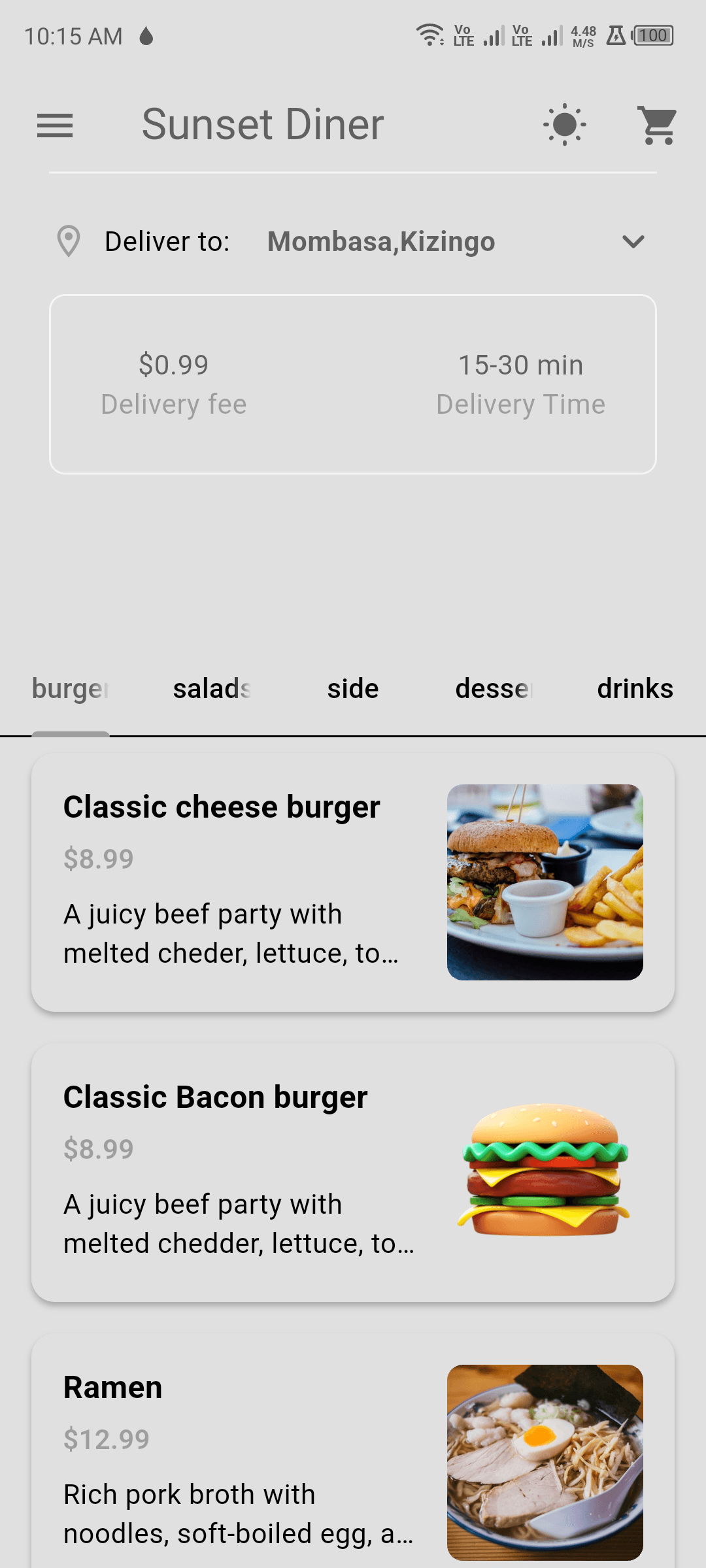
Why This Project Exists
Ordering food through an app should feel quick, visual, and almost effortless.
Users should be able to browse a menu, customize an order, add items to a cart, and continue without wondering whether the application saved their changes.
I built the Foodie App to explore how Flutter and Firebase could support that smooth, real-time experience.
The Problem
A food-ordering application combines several moving parts:
- User authentication
- Real-time menu data
- Product categories
- Cart management
- Item customization
- Order totals
- Loading states
- Responsive mobile layouts
The menu must remain current, user sessions must remain secure, and cart interactions must feel immediate.
A slow or confusing interface can make users abandon an order before checkout.
My Approach
I used Flutter for the mobile interface and Firebase for the backend services.
Firebase Authentication manages account creation and sign-in. Firestore stores menu categories, products, pricing, and availability.
Because Firestore provides real-time streams, menu changes can appear in the application without requiring users to refresh manually.
Provider manages local application state, including the active user, selected products, and shopping cart.
The cart supports adding items, adjusting quantities, removing products, and recalculating totals immediately.
I also implemented skeleton loading screens with shimmer effects so the interface remains visually stable while menu data is being retrieved.
Interesting Challenges
The first challenge was coordinating remote data with local cart state.
Menu information comes from Firestore, but the cart needs to respond instantly even when network conditions are imperfect.
Another challenge was handling authentication correctly. The application needed an AuthGate that could decide whether to display the login flow or the main application while Firebase checked the current user session.
Loading states also required attention. A blank screen while Firestore loaded made the application feel slow, even when the wait was short. Skeleton placeholders improved the perceived performance significantly.
Cart totals became more complex when accounting for quantities, optional add-ons, and different item configurations.
The Tech Stack
The Foodie App uses:
- Flutter
- Dart
- Firebase Authentication
- Cloud Firestore
- Provider
- Material Design
- Shimmer loading effects
- Slidable list interactions
Firebase reduced the amount of custom backend infrastructure required for authentication and real-time data.
Lessons Learned
Real-time applications still need thoughtful local state management.
The backend may deliver live updates, but the interface must decide how those updates interact with the user's current actions.
I also learned that perceived performance matters. Users are more comfortable waiting when the interface clearly communicates that content is loading.
Finally, food-ordering interfaces benefit from strong visual hierarchy. Images, prices, customization options, and call-to-action buttons must remain easy to scan.
Final Thoughts
The Foodie App brought together authentication, real-time data, mobile UI, cart logic, and responsive state management in one project.
It demonstrated how Flutter and Firebase can support a modern ordering experience without requiring a large custom backend.
Future improvements could include payments, order tracking, restaurant dashboards, delivery locations, push notifications, and customer reviews.
The project reinforced a simple principle: every second and every tap matters when users are hungry.