September 17, 2026 · Magati Joel
Building Farmora: A Farm Management App for Modern Farm Operations
How I built Farmora to bring livestock, inventory, sales, expenses and day-to-day farm operations into one centralized management system using Flutter, Supabase and PostgreSQL.
Why I Built Farmora
Running a farm involves much more than keeping livestock.
There are animals to monitor, products and supplies to track, sales to record, expenses to manage, customers and vendors to keep up with, and operational activities that need to be documented.
In many farms, some of these records still live in spreadsheets, notebooks, receipts, messages and separate financial systems.
I wanted to build a system that could bring these operational records into one place.
That idea became Farmora.
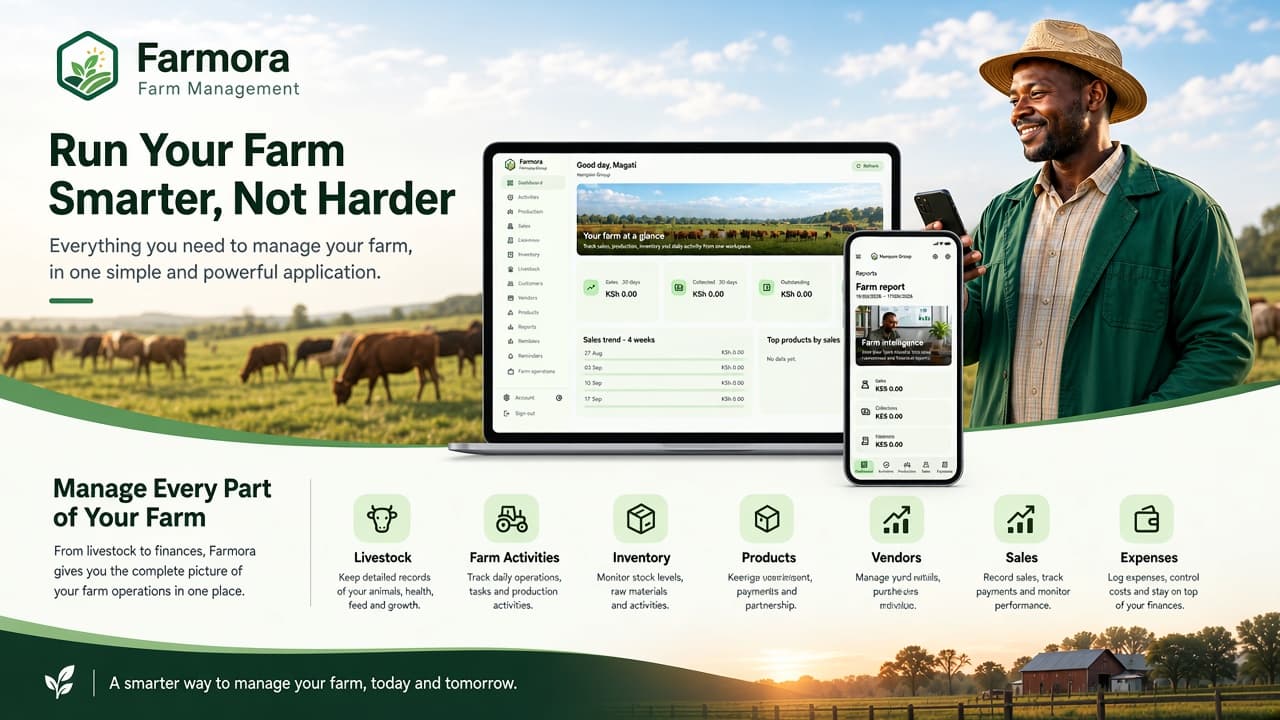
Farmora is a farm management application designed to help farm owners and managers manage livestock, inventory, sales, expenses, customers, vendors and other farm operations from a centralized system.
The Problem
Farm management can quickly become complicated because different parts of the operation are connected.
A farm may need to keep track of:
- Livestock
- Livestock categories and locations
- Key livestock records and measurements
- Farm activities
- Products and inventory
- Stock movements
- Customers
- Vendors
- Sales
- Payments
- Expenses
- Financial records
- Reports
When these records are maintained across different spreadsheets and paper records, getting a complete picture of the farm becomes difficult.
A manager may know how much was sold, but not immediately see how that relates to inventory.
They may know what was spent, but have to manually combine several records to understand the overall position of the farm.
Farmora was designed around these relationships.
The Goal
The main goal was simple:
Build a practical system that gives farm managers a clear picture of what is happening across the farm.
Instead of switching between spreadsheets, notebooks and separate records, the manager should be able to open Farmora and quickly understand:
- What livestock is on the farm
- What inventory is available
- What has been sold
- What has been spent
- Who the farm is dealing with
- What activities have been recorded
- How the farm is performing
The goal was not simply to digitize existing spreadsheets.
It was to create a foundation for managing farm operations digitally.
Building Around Farm Operations
One of the most important decisions was to avoid treating the application as a collection of unrelated CRUD screens.
Farm operations are connected.
For example:
Inventory → Sales → Payments → Customers
And:
Livestock → Activities → Measurements → Farm Records
While:
Expenses → Categories → Suppliers/Vendors → Financial Records
Thinking about these relationships helped shape both the database and the application architecture.
Livestock Management
Livestock is one of the most important areas of Farmora.
The application is designed to allow farms to maintain structured livestock records rather than relying entirely on notebooks or spreadsheets.
Records can be organized around areas such as:
- Livestock type
- Breed or category
- Location
- Individual or group records
- Key measurements
- Farm activities
The goal is to make livestock information easier to find, maintain and review over time.
This also provides a foundation for expanding livestock management as the application develops.
Inventory Management
Farm operations depend heavily on inventory.
Feed, supplies, products and other stock need to be monitored because inventory affects both daily operations and sales.
Farmora provides a centralized place to manage products and stock information.
The inventory workflow is designed around practical concepts such as:
- Products
- Categories
- Units
- Stock quantities
- Stock movements
- Inventory records
This creates a clearer relationship between what a farm has, what it uses and what it sells.
Sales Management
Sales are another important part of a farm's operation.
A farm may sell livestock, agricultural products or other farm outputs.
Farmora provides a sales workflow that can capture information such as:
- Sale date
- Customer
- Products
- Quantities
- Prices
- Payment information
- Outstanding balances
- Payment methods
The system is designed to make the relationship between a sale and its customer and payment records clearer.
Expenses
Tracking income without tracking expenses only provides part of the picture.
Farmora includes expense recording so farm managers can document operational spending.
Expenses can include information such as:
- Date
- Category
- Amount
- Description
- Related records
Organizing expenses in a structured system makes it easier to review where money is being spent and identify important operational patterns.
Customers and Vendors
Farm operations often involve multiple external parties.
Customers may purchase farm products while vendors and suppliers provide goods and services needed to operate the farm.
Farmora therefore treats customers and vendors as part of the operational system rather than keeping them as disconnected contact lists.
This provides a foundation for connecting people and organizations to sales, purchases and other farm records.
Dashboard and Farm Overview
A management system becomes much more useful when raw records can be turned into information that is easy to understand.
Farmora's dashboard brings important operational information together so managers can review the state of the farm without manually combining multiple records.
The dashboard is designed around useful areas such as:
- Livestock
- Inventory
- Sales
- Expenses
- Recent activity
- Operational summaries
The objective is to move from simply storing data to helping the manager understand the operation.
Configurable Farm Workflows
Not every farm operates in exactly the same way.
Different farms may have different livestock categories, locations, products, activities and record-keeping requirements.
Because of this, Farmora is being designed with farm-level configuration in mind.
The idea is to provide a flexible foundation where farms can adapt parts of the system to their own operational structure rather than forcing every farm into exactly the same workflow.
Technology Stack
Farmora is built using:
- Flutter
- Dart
- Supabase
- PostgreSQL
- Riverpod
- GoRouter
Flutter provides the cross-platform application interface while Supabase provides authentication, backend services and the PostgreSQL database.
Riverpod is used for application state and dependency management.
GoRouter handles application navigation and route structure.
Architecture
The application is organized around separate areas for:
- Authentication
- Farm context
- Repositories
- State management
- Business logic
- Feature modules
- UI
Feature areas such as livestock, inventory, sales and expenses communicate with the backend through repository layers.
This separation helps keep database operations away from presentation code and makes individual parts of the application easier to maintain and expand.
Designing for Real Farm Workflows
One of the biggest lessons from Farmora has been that farm-management software needs to reflect how farms actually operate.
A farm manager does not think in terms of database tables.
They think in terms of questions such as:
What livestock do we have?
What stock is available?
What did we sell today?
Who bought it?
What has been paid?
What expenses have we incurred?
What needs attention?
Those questions became more important than simply deciding which tables should exist.
The database structure exists to support the workflow—not the other way around.
From Spreadsheets to a Management System
One of the motivations behind Farmora was the amount of operational information that can accumulate in spreadsheets.
Spreadsheets can be extremely useful, but as a farm grows, maintaining interconnected records manually can become increasingly difficult.
Farmora provides a structured application layer around those records.
The longer-term goal is to make the transition from traditional record keeping to a dedicated farm-management system more practical without forcing every farm to operate in exactly the same way.
Designing for Different Farm Users
Farm management is rarely performed by a single person.
Managers, owners, office staff and other farm workers may interact with information differently.
Farmora therefore considers role-based access and farm-level data isolation as important parts of the architecture.
The objective is to make sure users can work with the information relevant to their responsibilities while maintaining appropriate protection around farm data.
What I Learned
Building Farmora has brought together several areas of application development.
Some of the biggest lessons have included:
- Designing relational farm data models
- Building reusable repository layers
- Managing application state with Riverpod
- Designing workflows around real-world operations
- Handling livestock records
- Managing inventory and stock data
- Building sales and expense workflows
- Designing dashboards around operational metrics
- Structuring role-based access
- Building responsive interfaces for different screen sizes
- Designing software that can adapt to different business workflows
The project has also reinforced an important principle:
Good business software starts with understanding the workflow before designing the interface.
What's Next?
Farmora is being developed as a growing platform rather than a one-off farm record system.
Future development areas include:
- More advanced livestock management
- Expanded inventory management
- Notifications and reminders
- More detailed operational reporting
- Additional farm configuration options
- Subscription and billing infrastructure
- Further workflow customization
- Deeper financial and operational analytics
The long-term goal is to create a practical farm-management platform that can adapt to different types of farms while reducing the administrative workload involved in keeping farm records.
Final Thoughts
Farmora started with a simple question:
Can farm operations be made easier when the important records are connected in one system?
Building the application has shown me that the challenge is much bigger than creating forms for livestock, sales or expenses.
The real challenge is understanding how those areas interact.
A livestock record can represent an operational activity.
An inventory change can be connected to a sale.
A sale can involve a customer and a payment.
An expense can be connected to a category or vendor.
And all of these records contribute to the bigger picture of how the farm is performing.
That is what makes Farmora one of the most interesting applications I have worked on.